In schools, colleges, universities and independent practice across the UK
The AI assistant for careers advisers
Have your usual conversation – CareerApp listens, builds a profile, and drafts an action plan for your client.
If you went into careers to help people, rather than spending time typing up notes, CareerApp is for you.
No card details needed.

CareerApp drafts an action plan with up to five chapters – you choose which
- Job suggestions
- Skill gaps
- Course suggestions
- Action plan
- Motivation
Recording a guidance interview
An AI note taker built for guidance interviews – the recording bar stays with you wherever you go in the app.

What changes
You stop writing it up
Record the session and the plan writes itself. No more extra hours spent turning rough notes into something actionable.
You stop hunting
Job ideas, courses, skill gaps, and motivational points come back drafted – all carefully based on your actual discussion.
It’s still your advice
Nothing reaches a client until you've read, edited, and decided it's right. It goes out under your name and your organisation's logo, because it's your guidance.
Your first appointment with CareerApp
It's quick and easy to get going.
Set yourself up
Add your name and logo once. Everything you produce from then on is branded as yours.
Add a client
A first name and a last name is enough to get going.
Have your appointment
Talk to your client the way you always do. Press record, check they're happy, and forget it's there.
Review and share
Read what's been drafted, change what you'd change, pick the chapters you want, and send it over.
A client record that builds with every appointment
Your client's profile gets richer over time.


The action plan your client walks away with
More than a list of next steps: job ideas, skill gaps, courses and motivation too, all drafted from your client's profile and every conversation you've had with them. Use all five chapters or pick the ones that fit.
Job suggestions
Up to five roles ranked for fit, each taking into account local demand and trends.
Skill gaps
What sits between where your client is now and where they want to be, and a practical suggestion for each one.
Course suggestions
Relevant qualifications and the course titles to search for, plus providers near them and online options for those who can't travel.
Action plan
A timeline with milestones and steps, written to your client rather than about them – so it reads as a plan, not a report.
Motivation
Developing a career can feel overwhelming. This chapter is about finding the genuine positives in their situation and history.
Everything it does, from recording to action plan
No modules, no add-ons, no upgrades – you get it all.
Recording and notes
Everything that happens while you're in the room.
Records in your browser
Nothing to install, no app to get signed off by IT, no hardware to remember. Open the page and press record.
You can see it’s working
A bar across the top shows the status, a timer and a live level meter that moves when someone speaks – so you never get to the end of an hour wondering whether it caught any of it.
It follows you around the app
Look something up mid-session and the recording bar comes with you. Pause and resume as often as you need to.
Consent, asked for and logged
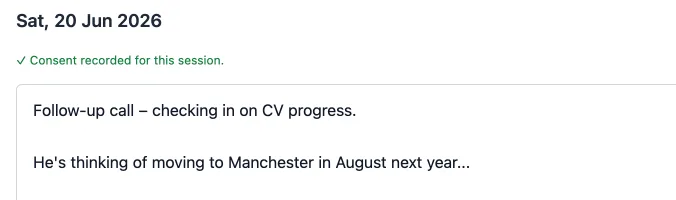
Before the first recording of a session you're prompted to confirm your client is happy, and that confirmation is recorded against the session with a date and time.
A private notes pad
Jot as you go. Your notes shape the write-up but are never shown to the client and never quoted back at them.
Typed notes are fine too
A phone catch-up, or a client who'd rather not be recorded? Type instead. Everything still works.
The write-up
What happens in the ten minutes after they leave.
The session becomes a profile
CareerApp drafts an update to nine areas of your client's record: their career status, education, work experience, skills and strengths, personality and work style, values and priorities, challenges and constraints, interests and aspirations, and goals.
You review before anything is saved
Every suggested field is put in front of you to accept, edit or clear. Nothing is written to a client's record behind your back.
Their record deepens, session by session
A second appointment builds on what's already there rather than overwriting it, so a long-running case gets richer instead of being rewritten each time.
Dates handled properly
An accurate picture is important, so “Last September” and “two years ago” are worked out against the date of the session, rather than guessed at.
Sharing the action plan
What your client actually walks away with.
Your branding, not ours
Your logo, your introduction, your sign-off. Set it once in settings and every action plan picks it up.
You choose what goes in
Pick the chapters that suit each client. Not everyone needs all five.
Edit anything
Every chapter is fully editable. Not happy with a draft? Either edit directly, or ask for a change in plain English – like “make it shorter” or “focus on part-time options”.
Share it
Send a link, email it, or print it out for someone who'd rather have paper.
What it costs
One price, everything included.
Free for 30 days
£40a month after that
- No card details to start your trial
- As many clients and sessions as you like
- As many action plans as you need
- Cancel any time, in a couple of clicks
No card details needed.
Why only one price?
Because we want to make modestly-priced helpful tools for careers advisors as widely available as possible.
What if I forget to cancel the trial?
There's nothing to forget. We don't take card details up front, so there's no card to charge. If the trial runs out and you haven't added one, everything just pauses.
Is anything charged per use?
No. Record as many sessions and generate as much as you like – it's the same £40 whether you see three clients a month or thirty.

Questions careers advisers ask
If yours isn't here, email us and we'll answer it properly.
What settings does it work in?
Anywhere you hold one-to-one guidance interviews: schools and colleges, including personal guidance for Gatsby benchmark 8, universities, the National Careers Service, local authority and employability services, prisons and probation, and independent practice. It uses UK terminology for qualifications, courses and providers throughout.
Do I need to install anything?
No. CareerApp runs in your web browser. There's nothing to download, nothing for your IT team to approve, and nothing to keep updated.
Which browsers does it work in?
All modern desktop and tablet browsers (Chrome, Firefox, Edge, Safari, and others). You'll need to allow access to the microphone the first time you record, which your browser will ask about.
Can I use it on a tablet?
Yes. CareerApp is built for desktop, laptop, and tablet screens. We don't recommend using it primarily on a phone – there's a lot of writing and reviewing involved, and a phone is the wrong shape for it.
Do I need my client’s consent to record?
Yes, and CareerApp helps you get it. Before the first recording of each session you're prompted to confirm your client is happy to be recorded, and that confirmation is stored against the session with the date and time.
What happens to the recordings?
The recording stays on your own device until the session is written up, then it's deleted. Only the transcript is kept.
Where is my clients’ information stored, and is it GDPR-compliant?
On servers in the EU, and covered by both UK GDPR and EU GDPR. You stay in control of it: it's your client record, and you can edit or delete anything in it at any time.
Is my clients’ information used to train AI models?
No. Never. Nothing you or your clients put into CareerApp is used to train anybody's model.
Which AI does it use?
A leading frontier model, chosen for the quality of its writing and its reasoning about careers. We don't tie ourselves publicly to one supplier, so we're free to move to a better one when it appears.
Is the AI making decisions about my clients?
No. It drafts, you decide. Every suggestion is put in front of you to accept, edit or throw away, and nothing reaches a client until you've said so. The professional judgement stays yours – CareerApp just saves you the typing.
What if what it drafts is wrong?
Change it. Everything is editable, and you can ask for a rewrite in plain English rather than starting from scratch. Treat a draft as a first pass from a keen assistant: useful, quick, and in need of your eye before it goes anywhere.
Can I put my own branding on the action plan?
Yes. Add your logo, write your own introduction and sign-off, and every action plan you share uses them. Your client sees your organisation, not ours.
Can I use it without recording anything?
Yes. Type your notes instead and everything else works exactly the same way.
Does it work for a team?
Each account is for one adviser. A team can take an account each – there's no shared team account at the moment.
Do I have to give card details to try it?
No. The 30-day trial needs nothing but an email address. We don't ask for a card, so there's nothing to forget to cancel.
What happens when the trial ends?
If you've added a card, your subscription starts at £40 a month. If you haven't, everything simply pauses – your clients and notes stay exactly as they were, and adding a card later picks up where you left off.
How do I cancel?
In your settings, in a couple of clicks. No phone call, no notice period, no talking to anyone.
What happens to my data if I stop paying?
It stays put and stays yours. You can still get to your client records, and we'd encourage you to print or save anything you want to keep before you go.

Give it a go with your next appointment
30 days, free, with no card details asked for. Record one session and see what comes back – that's usually enough to know whether it's for you.
The recording stays on your own device until the session is written up, then it's deleted. Only the transcript is kept.

The details, in full
All the info, including what CareerApp doesn't do. Useful if you're comparing tools or writing a business case.
What CareerApp is
CareerApp is a web application for careers advisers and guidance practitioners. It records a guidance interview, transcribes it, and turns it into a structured client record and a drafted action plan the adviser edits and shares with their client.
It is aimed at UK practice and uses UK terminology throughout – qualifications, course titles and provider types are those a UK client would recognise.
Who it is for
Careers advisers working in schools, colleges, universities, the National Careers Service, local authorities, employability charities, prisons and probation, and independent practice.
It assumes no technical knowledge. It is used in a browser, with no installation, configuration or IT involvement.
What it does, specifically
Records a session in the browser, with consent prompted for and logged against the session. Provides a private notepad for the adviser alongside the recording, the contents of which are never shown to the client.
Transcribes the recording and drafts an update to nine areas of the client profile: career status, educational background, work experience, skills and strengths, personality traits and work style, values and priorities, challenges and constraints, career interests and aspirations, and goals. The adviser reviews and edits every suggested field before it is saved.
Drafts an action plan for the client from that profile, in up to five chapters: job suggestions – up to five roles ranked for fit, each with an estimate of local demand and whether it is rising, falling or stable; skill gaps, each with a practical suggestion for closing it; course suggestions – relevant qualifications, the UK course titles to search for, and local and online providers; a timeline of milestones and next steps, written to the client; and a motivational summary grounded in what the client actually said. Each chapter is fully editable and can be regenerated with a plain-English instruction.
The adviser chooses which chapters go in for each client. The action plan carries the adviser's own logo, introduction and sign-off, and can be shared by link, emailed or printed.
What it does not do
It does not make decisions about clients, and it does not send anything to a client on its own. Every draft is reviewed and edited by the adviser first.
It does not offer shared team accounts – each account belongs to one adviser.
It is not designed for phone-sized screens.
It does not connect to a school MIS, a case management system, or a CRM (although do contact us if this is important to you).
It does not use client information to train AI models.
What it costs
A 30-day free trial with no card details required, then £40 a month. Unlimited clients, sessions and action plans throughout – nothing is metered or charged per use.
Cancellable at any time from within the application. If a trial ends without a card being added, the account pauses rather than being deleted, and adding a card later resumes it with the client records intact.
Practical requirements
A modern desktop or tablet browser, an internet connection, and permission for the browser to use the microphone if recording. There is nothing to install.
Client data is stored on servers in the EU and covered by UK and EU data protection law. The adviser is the data controller for their clients' personal data; CareerApp is the processor.